


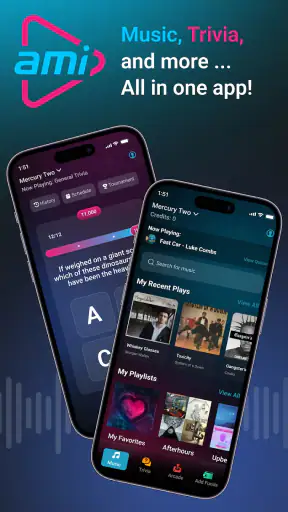
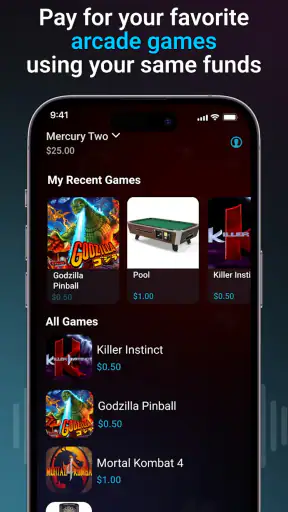
I tried AMI Play in the setting it is actually built for: a visit to a venue with an AMI entertainment system, where the phone becomes a companion for choosing music, joining trivia, and handling arcade-game payments. That focus matters. This is not a general music player, a streaming replacement, or a tool for creating playlists at home. It is a venue-based music and entertainment app from AMI Entertainment Network, and its value appears when you are already in one of those locations.
My first impression was that the app is more useful as a quick control panel than as a destination in its own right. I could use it to take part in the entertainment around me without repeatedly walking over to the machine. The free price makes it easy to try, while the Teen content rating signals that it is aimed at a broad social audience rather than very young children. The important question is not whether it can replace the music apps already on your phone; it cannot. The question is whether it makes an AMI venue easier and more engaging to use.
Starting the night with the right kind of control
The creative starting point here is not composing music or editing audio. It is deciding what the room should hear and what activity should happen next. When I opened the app in an AMI venue, I approached it as a way to shape the local experience: choose music, take part in trivia, or use the phone as part of an arcade visit. That is a small but practical distinction from ordinary audio apps, which assume I am listening privately through headphones or a personal speaker.
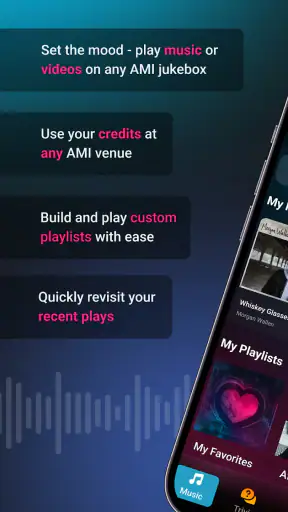
Music selection is the clearest entry point. Instead of treating the app as a library I own, I treated it as a remote interface for the venue’s entertainment setup. That makes it useful in a group, especially when several people want to contribute without crowding around the main machine. It also changes the social dynamic: the phone is not just playing something for me, but helping me participate in what everyone nearby is hearing.
I would not install this expecting an on-demand catalog, offline listening, or the same control I get from a conventional streaming service. Its usefulness depends on being at an AMI-supported location. That dependency is the first trade-off to understand, and it is also why the app feels focused rather than bloated. It has a clear job, but that job only exists in the right physical setting.
The app’s store summary describes three connected activities: controlling music, playing trivia, and paying for arcade games at AMI venues. In practice, I found that combination more interesting than a music-only remote. A music choice can start the interaction, but trivia and arcade payments give the phone additional reasons to stay open during a night out. If your group moves between those activities, the app can feel like a single bridge between them rather than three unrelated tasks.
Choosing music without taking over the room
One useful habit is to decide your song choice before approaching the machine or opening the app. In a busy venue, the hardest part is often not the selection itself but agreeing on what the group wants. I found the app works best when someone acts as the informal music coordinator: they gather suggestions, make the choice, and keep the process moving instead of handing the phone around constantly.
That workflow is a subtle strength. A physical jukebox can become a bottleneck, while a phone-based control option lets the group discuss the next selection away from the machine. It is also less awkward for someone who does not want to stand in front of the room while browsing. The experience remains social, but the control is more discreet.
There is a limitation, though. The app does not turn a venue into a private listening session. Other people are sharing the same environment, and the available experience is shaped by the AMI setup where you are using it. Anyone looking for personal audio control, detailed queue management, or a carefully organized private library will be happier with a normal music service.
How the making process works in a venue
Thinking of the app as a “making” tool may sound unusual, but there is a small creative process involved. I start with a mood, a group preference, or a trivia interest, then use the app to turn that idea into an action at the venue. The output is not a song file or a finished project. It is a shared moment: a selected track, a completed trivia round, or an arcade session funded through the phone.
That makes AMI Play closer to a remote control and participation layer than a production app. There is no reason to open it when I am working on a playlist at home, editing a recording, or preparing audio for publication. Its role begins when the creative decision needs to reach an AMI entertainment system in a public place.
I found the music workflow easiest when I used it for a specific purpose rather than browsing without a plan. For example, if friends are taking turns choosing songs, the app helps keep the process organized around the venue’s system. If the group is waiting for an activity, trivia gives the phone a second use instead of leaving everyone to scroll through unrelated apps.
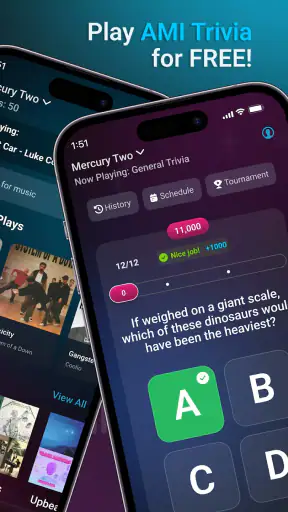
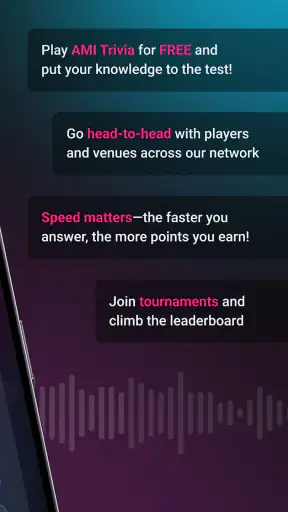
The trivia element also changes how I judge the app. A standard music remote would be useful for a few minutes, then disappear into my pocket. Trivia gives it a more active role. It can become the thing people check between songs or while deciding which arcade game to play. I would still describe this as lightweight entertainment rather than a deep trivia platform, but it fits the venue context well.
For arcade payments, I would approach the app with a little more care than I would for music selection. Payment-related actions deserve a deliberate check of the selected venue, the intended game, and the amount involved before confirming anything. I would not hand my unlocked phone to a stranger or let a child use the payment function without supervision. The convenience is helpful, but convenience should not replace basic attention when money is involved.
A realistic evening workflow
Imagine meeting friends at an AMI venue after dinner. One person wants music, another suggests trivia, and someone else notices an arcade game nearby. Instead of treating each activity as a separate trip to a machine, I can use AMI Play as the shared starting point. I help choose the music, switch to trivia while people are waiting, and then use the arcade-payment option when the group is ready to play.
That scenario shows where the app earns its place. It is not saving me hours or transforming audio production; it is reducing small interruptions during a social outing. The phone becomes a practical remote, a game entry point, and a way to stay involved. If the venue has only one entertainment machine and several people want to use it, that reduction in friction can be noticeable.
The best user is therefore someone who visits AMI venues with friends, enjoys public music and arcade entertainment, and wants a phone-based way to participate. People who mainly listen alone, build personal playlists, or need professional audio tools should skip it. Installing it outside the venue context gives me very little to do.
Iteration: adjusting choices as the group changes
The app’s most interesting form of iteration is social rather than technical. I may begin with one song in mind, discover that the group prefers something else, and change direction before the evening settles into a rhythm. Trivia can interrupt a predictable music pattern, while an arcade game can shift the group from passive listening to active play. AMI Play supports those changes because its functions sit close together.
I learned that it is better to treat the app as a shared tool than as one person’s private remote. If I make every decision myself, the convenience can become control. A better approach is to use the phone to collect quick suggestions, then confirm the choice with the people nearby. That keeps the app from creating the same argument it was meant to avoid.
Another practical tip is to keep the app’s role narrow during each moment. When choosing music, focus on music. When the group wants trivia, move to that activity rather than continuing to search for songs. When arcade play begins, check the payment step carefully and then put the phone away. This makes the experience feel smoother and reduces accidental taps or unnecessary browsing.
The trade-off is that the app’s flexibility is tied to the venue’s equipment and atmosphere. A quiet location with little participation may make the features feel unnecessary. In a crowded place, the same tools can be more valuable, but the surrounding noise and distractions may make any phone-based interaction less comfortable. AMI Play is strongest when the venue already has an active entertainment flow for it to support.
Compared with a traditional jukebox interaction, the app offers more personal convenience and less physical queueing. Compared with a streaming app, it offers less control over private listening and more connection to a shared room. Compared with a standalone arcade-payment system, it brings music and trivia into the same experience. None of these comparisons makes it universally better; they show that it is designed for a particular kind of outing.
What to expect from the current version
The current version is 5.3.1, and I would keep the app updated before relying on it for a planned visit. Venue-linked apps can be especially sensitive to changes in the surrounding entertainment system, so using the latest available version is a sensible preparation step. I would also open it before the group arrives, rather than making everyone wait while I install or configure it at the machine.
AMI Play has been available since June 29, 2012, which helps explain why it feels like an established companion to a venue ecosystem rather than a new social experiment. Its reach is substantial, with over a million installs, and the app holds a 4.6 average from around sixty-five thousand ratings. Those figures suggest that many users find the basic concept dependable enough to keep using, although they do not remove the location-based limitations.
The number of ratings also makes me more comfortable recommending it as something worth trying when I am already visiting an AMI venue. I would not recommend installing it solely because it has a high score. The score reflects satisfaction among people who are likely encountering the intended use case, while my own decision would still depend on whether the venue supports the experience and whether I want music, trivia, or arcade participation there.
Handoff: turning phone choices into venue actions
In a creative workflow, handoff is the moment when an idea leaves the creator’s screen and reaches its audience. AMI Play has a very literal version of that process. I make a selection or choose an activity on the phone, then the result is handed to the AMI venue system or arcade experience. The app is valuable because it shortens that distance without pretending to be the entire entertainment platform.
The handoff works best when I verify what I am sending before confirming it. For music, that means checking the intended choice and making sure the group is ready for it. For trivia, it means treating the phone as an interactive controller rather than a passive screen. For arcade payments, it means being especially attentive to the venue and game selection. These small checks are more useful than rushing for the sake of speed.
I also like that the app’s handoff is social. A normal music app delivers audio directly to me, but this one delivers a decision into a shared physical environment. That makes the result more visible and more immediate. It also means the app cannot guarantee that every choice will suit everyone; the handoff is public, so personal taste and venue etiquette still matter.
Users may reasonably wonder whether this is a replacement for a music subscription. My answer is no. Streaming services remain better for private listening, discovery across many locations, downloads, personal libraries, and uninterrupted control. AMI Play is better only when the goal is to interact with an AMI venue. Installing both types of app makes sense if I listen privately during the week and visit these venues socially, but one should not be mistaken for the other.
Another likely question is whether it is suitable for families. The Teen age rating means I would treat it as an app for teens and adults, with an adult keeping control of any payment-related use by younger children. The music and trivia functions may fit a mixed group, but the responsible choice is to supervise the financial side rather than assuming the phone is harmless simply because the app itself is free.
Where the friction shows up
The biggest weakness is situational dependence. If I am not at an AMI venue, the app offers no comparable everyday utility to a music player. That makes it easy to forget until the moment I need it. I would solve that by installing it before a planned outing and checking it briefly at the venue, rather than expecting it to be a regular part of my home screen.
The second limitation is scope. There is no reason to choose it for audio editing, publishing, recording, or managing creative files. Someone assessing apps from a creator’s perspective should be clear about this: AMI Play does not take an idea from draft to finished media. Its “output” is a venue action, not a downloadable creative asset. For actual production work, a dedicated audio editor or music service is the appropriate alternative.
The third friction is shared control. A phone can make access easier, but it can also create confusion if several people are trying to direct the same evening. I recommend agreeing on who is making the next selection and keeping payment decisions with the person who understands the transaction. That simple division of responsibility makes the app feel more helpful and less chaotic.
My verdict for venue-based entertainment
After using it as intended, I see AMI Play as a focused companion rather than an essential app for everyone. It gives AMI Entertainment Network venues a more convenient mobile layer for music control, trivia, and arcade payments. The free price lowers the barrier to trying it, and the strong 4.6 average from around sixty-five thousand ratings indicates that the concept works well for a sizeable audience.
I would recommend it to someone who already visits AMI venues and wants to participate without standing at the main machine. It is particularly suitable for groups that move between music, trivia, and arcade games during the same outing. The app is also a good fit for the friend who usually ends up coordinating the next song or activity, because it makes that role less dependent on physical access to the venue equipment.
I would skip it if I want a personal music library, serious audio creation, offline playback, or a tool for exporting work to another platform. It is not a substitute for a streaming service, an audio editor, or a professional handoff system. Its strength comes from being specific, and that specificity is also its boundary.
My final recommendation is simple: install AMI Play when an AMI venue is part of your plans, not as a general-purpose music app. Use it to make group choices, switch naturally between entertainment options, and handle arcade payments carefully. When those are the problems you actually have, the app is a convenient and well-targeted solution. When they are not, your usual music and gaming apps will serve you better.


